xBit v4.1.11 Release Notes
November 12, 2026
🚀 New Features
Evidence ID
- Choose the Evidence ID a request item gets when it's accepted into the workflow.
In
Admin>Form Builder, edit the Evidence ID field of Evidence Intake. Each option shows the ID it produces:
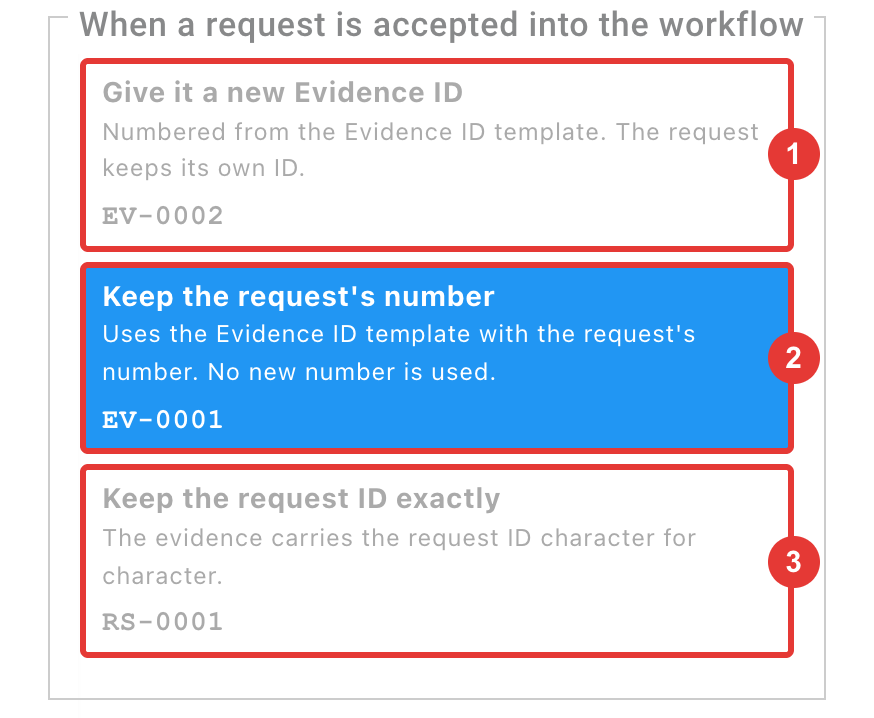
Give it a new Evidence ID: the next number in the sequence (EV-0002). The request keeps its own ID.Keep the request's number: the Evidence ID template with the request's number (EV-0001).-
Keep the request ID exactly: the request ID unchanged (RS-0001). Offered when the Request Submission Template differs. -
Both "keep" options need Sequence Token > Scope set to Global and the field In Request Submission Form.
- Your current setting carries over, so accepted requests get the same IDs as before.
- See Form Builder.
Case Status
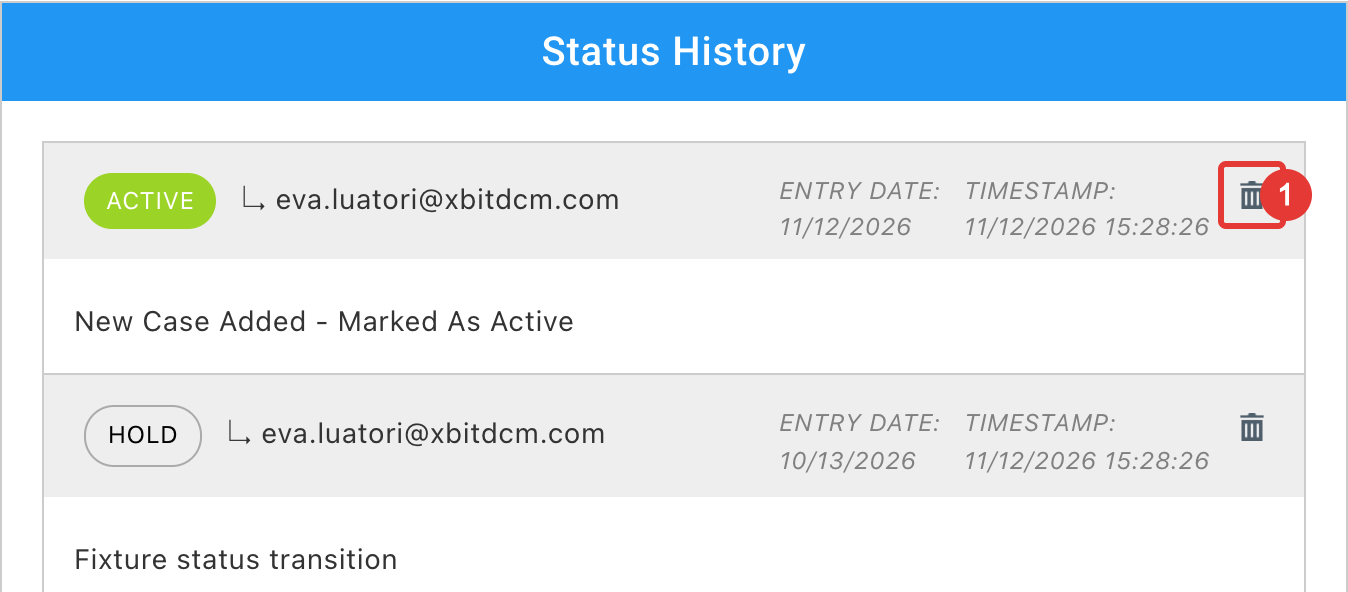
- Delete a status entered by mistake from a case's Status History, with an optional reason recorded in the case audit log.
Admins turn this on with Delete Case Status History Entries in
Admin>About / Settings. It's off by default.
-
The delete icon on each entry. See Change the case status.
-
Completed Cases Shown as Open: if the 4.1.10 update left completed cases looking open, this page in the
Issuesmenu fixes them. See Issues.
Reports
Two new settings in Admin > About / Settings > General:
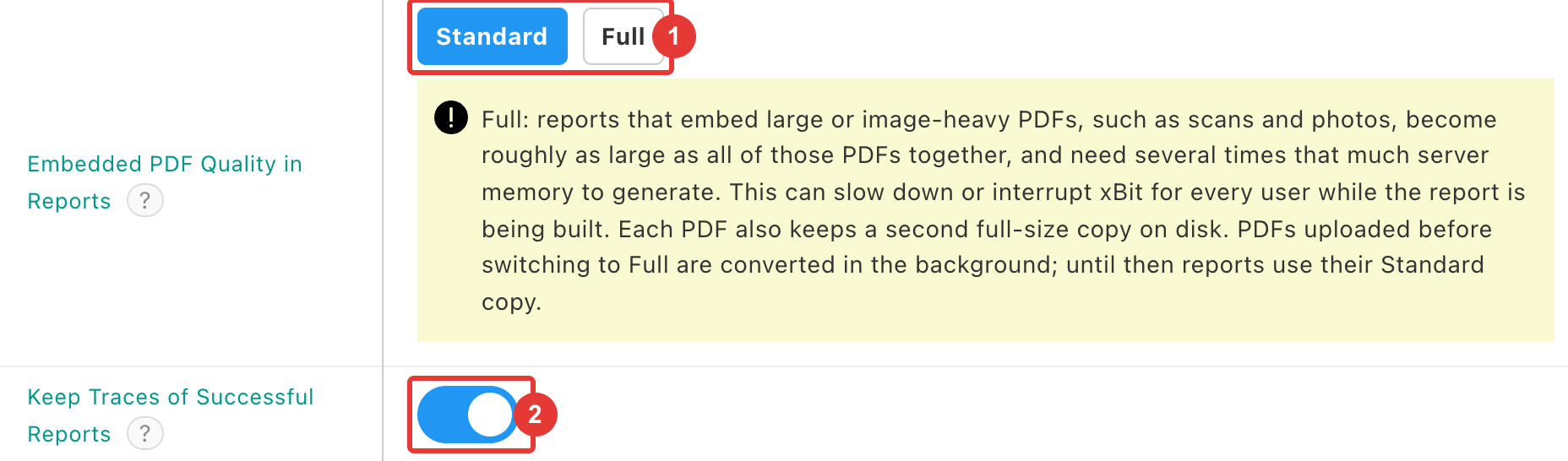
- Embedded PDF Quality in Reports:
Standard(default) embeds uploaded PDFs as 150 dpi copies, as today.Fullkeeps the quality they were uploaded with, so charts and screenshots stay sharp, but reports get much larger.
- Keep Traces of Successful Reports: off, only failed reports keep their trace.
When a case report or Report Builder report fails, the error offers Download the report trace to send to support.
Admins can download the last 24 hours of traces from Admin > Report Traces:
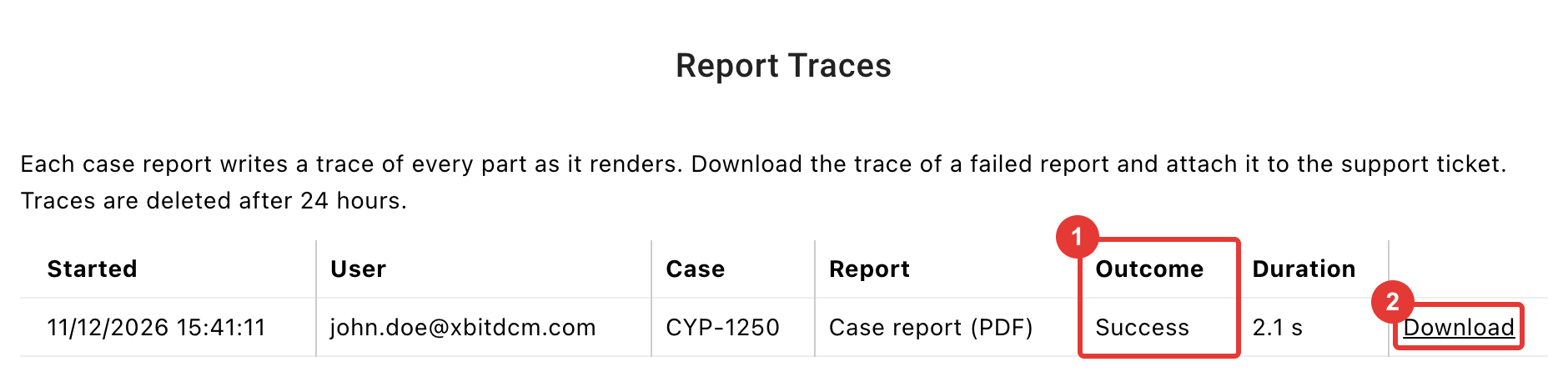
- Outcome: Success, Failed or Did not finish.
- Download: the trace to attach to your support ticket.
Active Directory / LDAP
- Choose which directory attributes fill a user's first and last name with First name attribute and Last name attribute. Left empty, names are filled as before.
Asset Manager & Device Lookup
- Asset Manager can be linked to directly: the address bar follows the window, holder, grant or asset on screen, so you can copy and share it.
- Device Lookup links work again, opening a given device, manufacturer, extraction method, tool or pinout.
Labels
- New installations start with a case label and an evidence label, each showing the ID and its barcode.
Speed
- Pages, tables, charts and reports opened at the same time no longer wait for each other. A slow report in one tab no longer holds up your other tabs.
- Cases with many evidence items open faster.
- Case and evidence pages no longer prepare labels on every visit.
The Label Contents Cut Off check now happens when you print, with
Reconfigure,Preview LabelorPrint anyway.
🐛 Bug Fixes
Evidence ID
- Editing an item on a request no longer gives it a new Evidence ID or uses up a number from the sequence.
- Saving with Reset Sequence on and the default Sequence Start no longer fails. Sequence Start now shows the next number to be issued.
Search
- Case Manager search ignores letter case:
carrfindsCARR, DAVID. - Global search for a hyphenated term, such as
2026-0012345, returns only attachments containing that exact term. A term in double quotes is searched as a phrase. - Case table view search finds a case by any of its evidence numbers, names, barcodes or text values, however many it has.
Case Status
- Completed cases no longer show as Overdue or open when the Completed status they were closed with has been deactivated. Deactivating or reactivating a status type no longer changes past completed dates.
List Manager
- Renaming a list entry now updates the cases, evidence and requests that use it, and global search finds the new name.
- Renamed built-in entries, such as a forensic software, priority or legal order type, show the new name everywhere.
- Changing the system language also translates built-in entries already saved on records.
Evidence
- Changing an evidence item's work type no longer gets stuck on required fields archived in the new work type.
- Deleting the most recent Chain of Custody entry updates the evidence's location straight away.
- A date typed into a form on a slow connection is no longer refused as invalid on save.
Reports
- A PDF embedded in a Report Builder report no longer has a large PDF icon printed in front of it.
Stats
- Stats Explorer applies a custom date range again, in the installation's date format or as year-month-day.
- The Stats Explorer report header no longer shows a custom date range one day early in timezones behind UTC.
USSS
- The USSS Stats report uploads to the USSS Forensic Partner Reporting portal again, instead of asking for template version 1.1.0.
API
- Updating a Case ID through the API changes the Case ID users see, as an edit in xBit does. It's refused while Edit Case ID is off.
- Priority, deadline, agency, case type and reference exhibit sent through the API are checked, saved and audited as on screen.
General
- Buttons on pages such as External Users, Lab Submission, Report Builder and List Manager respond to a click made right after the page loads.
- An address that doesn't exist shows a 404 page, with the navigation when logged in or a link to the login page when not.
- Device Lookup's Only Devices With Attachments and Only Common Manufacturers filters refresh the list again.
🌈 UI Changes
Evidence Manager
- The Evidence Type filter lists disabled types after active ones, marked (Disabled), and leaves out disabled types with no evidence.
Expenses
- The New Expense form no longer scrolls sideways.
Form Builder
- Hovering a sub-field in a field group's edit panel shows the drag handle again.
Asset Manager
- The asset holders, government grants, new asset holder and new grant windows are now standard dialogs, closed with ×, Esc or a click outside.
General
- A sharper loading animation: the animated xBit cube, without the white box.