Issues
The Issues menu lists problems in your data that need an Admin's decision, usually found while xBit was being updated.
It appears in the top menu, after Help, only while there is something in it.
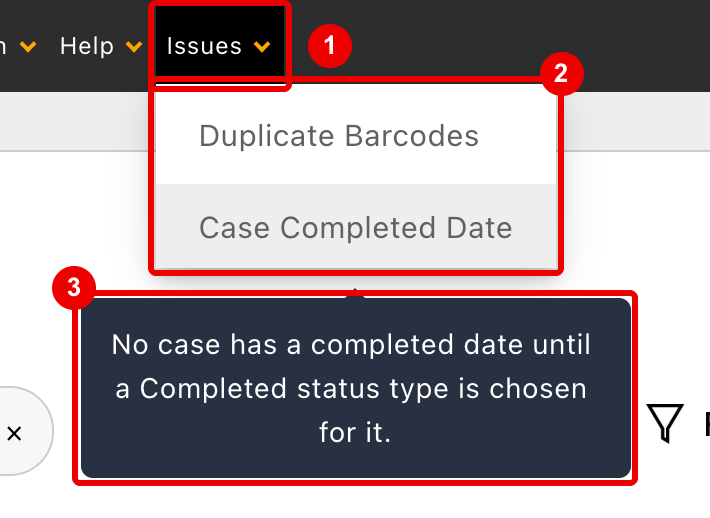
Issues: shown to Admins only, and only while it has items.- The items. Each opens its report in a new browser tab.
- Hover over an item to see what it is about.
Most systems never see this menu.
Who can see it
- Only Admins see the menu and can open its reports.
- Other users never see the menu. Opening a report's address directly shows Only admins allowed to run this script.
Items
| Item | Appears when | Leaves the menu when |
|---|---|---|
| Duplicate Barcodes | The update to 4.1.10 finds a barcode held by more than one case or evidence item | The report is opened and no barcode is shared any more |
| Case Completed Date | The update to 4.1.10 finds the system Completed case status type deactivated | A status type is chosen for the case completed date and the page is opened again |
| Exponential Notation Issue | The 3.13.5 update found numeric values that may have lost precision | Every entry is marked resolved, or an Admin hides it |
Nothing on these pages fixes data by itself. You fix the records, then the item goes away.
Duplicate Barcodes
A barcode held by more than one record can't be scanned reliably: xBit can't tell which record was meant. The report lists every such barcode.
| Column | Shows |
|---|---|
| Barcode | The shared code, once per group |
| Form | Where the barcode is: Case Information, Evidence Intake or Evidence type |
| Record | Case or Evidence with its ID; click to open the record with the barcode field highlighted |
| Created | When the record was created |
- Only cases and evidence count. Requests keep their barcodes separately.
- Deleted records are greyed out and marked (deleted).
- Fields whose Uniqueness is Not checked are listed too.
To resolve a shared barcode:
- Agree with the agency which record keeps it.
- Open each other record from Record and give it a new barcode, for example with Create New (see Barcodes).
- Relabel those items.
- Open the report again. With nothing left, it shows No barcode is held by more than one record. and leaves the menu.
The report is also linked from the Form Builder. Changing a Barcode field's Uniqueness is refused while records would clash (Uniqueness can't change yet), with an Open the Duplicate Barcodes report link.
Case Completed Date
A case's completed date comes from the status types marked Use for case completed date (see Case completed date). If the update finds the system Completed status type deactivated, it can't choose one for you, so this item asks. Until a type is chosen, no case has a completed date: deadline tags, the Case Dashboard and Stats count completed cases as open.
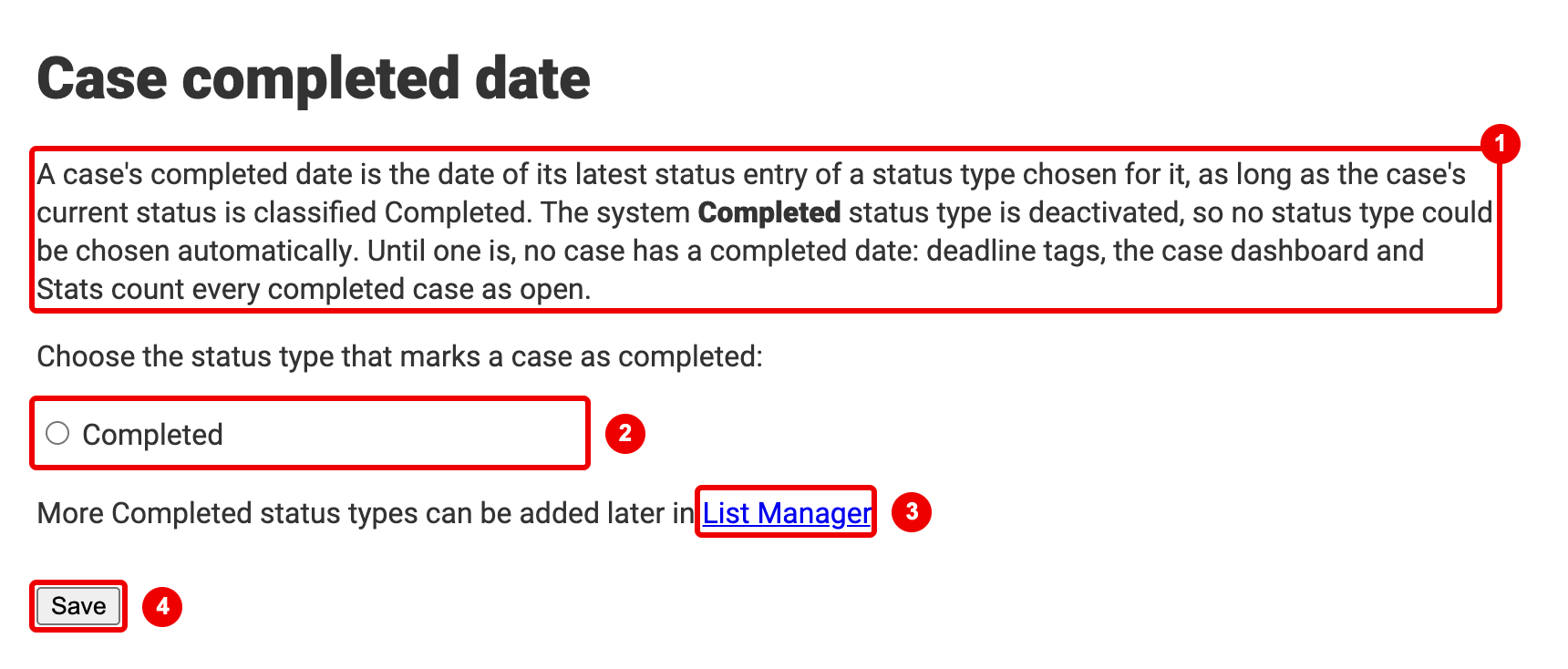
- Why the page is shown.
- The active status types classified Completed. Choose the one that marks a case as completed.
- List Manager: add more Completed status types later.
- Save.
After Save, the page shows which status type the completed date is taken from, and the item leaves the menu.
The choice is recorded in the system log (Admin > Audit Logs; see System log).
- No status type to choose? The page says so. Activate or create a Completed status type in List Manager, then come back.
- You can also tick Use for case completed date in List Manager instead. The item then leaves the menu the next time the page is opened.
Exponential Notation Issue
Older xBit versions could save long numbers, such as SIM card numbers, in a rounded form like 1.23457e+19.
The 3.13.5 update flagged the values that may be affected (see the 3.13.5 release notes).
The page, Notice: Exponential Notation Data Conversion Issue, has two lists:
- Exponential Notation (Critical): values that likely lost digits.
- Decimal Notation (Warning): values whose digits after the decimal point may differ.
Each entry shows the case, the evidence item, who saved the value and when, and the field. Range gives the lowest (min) and highest (max) value the user could have entered, next to the saved value.
- Click Review to open the record with the field highlighted, and correct the value if needed.
- Click Mark Resolved. Click Resolved to undo.
- When every entry is resolved, the item leaves the menu. To remove it sooner, click Hide Issues tab from xBit Menu at the bottom of the page.
Related
- Barcodes: barcode fields, uniqueness and scanning.
- List Manager: case status types and the case completed date.
- Health: environment checks, in
Admin>About / Settings. These are not listed underIssues.