xBit v4.1.10 Release Notes
October 16, 2026
Feature Highlight: Automatic Barcodes
Every case and evidence item gets its barcode. Nobody has to remember.
Until now, a barcode was added by hand: copy the ID, click Scan Existing, paste, save.
When someone forgot, the label printed without one.
Now xBit adds it for you, the moment a case or evidence item is created.
✨ What's new
| Feature | Description |
|---|---|
| 🏷️ Barcode Source | Match the Case ID or Evidence ID, or generate a number. |
| 🔁 Backfill | Add barcodes to existing records that have none. |
| 🛡️ Unique barcodes | Duplicates are refused when they're entered. |
| 🖨️ No blank labels | xBit asks before printing a label without a barcode. |
| 🕓 Barcode history | An old label still finds its record. |
🏷️ Choose where barcodes come from
Go to Admin > Form Builder, open Case Information or Evidence Intake, and edit the Barcode field.
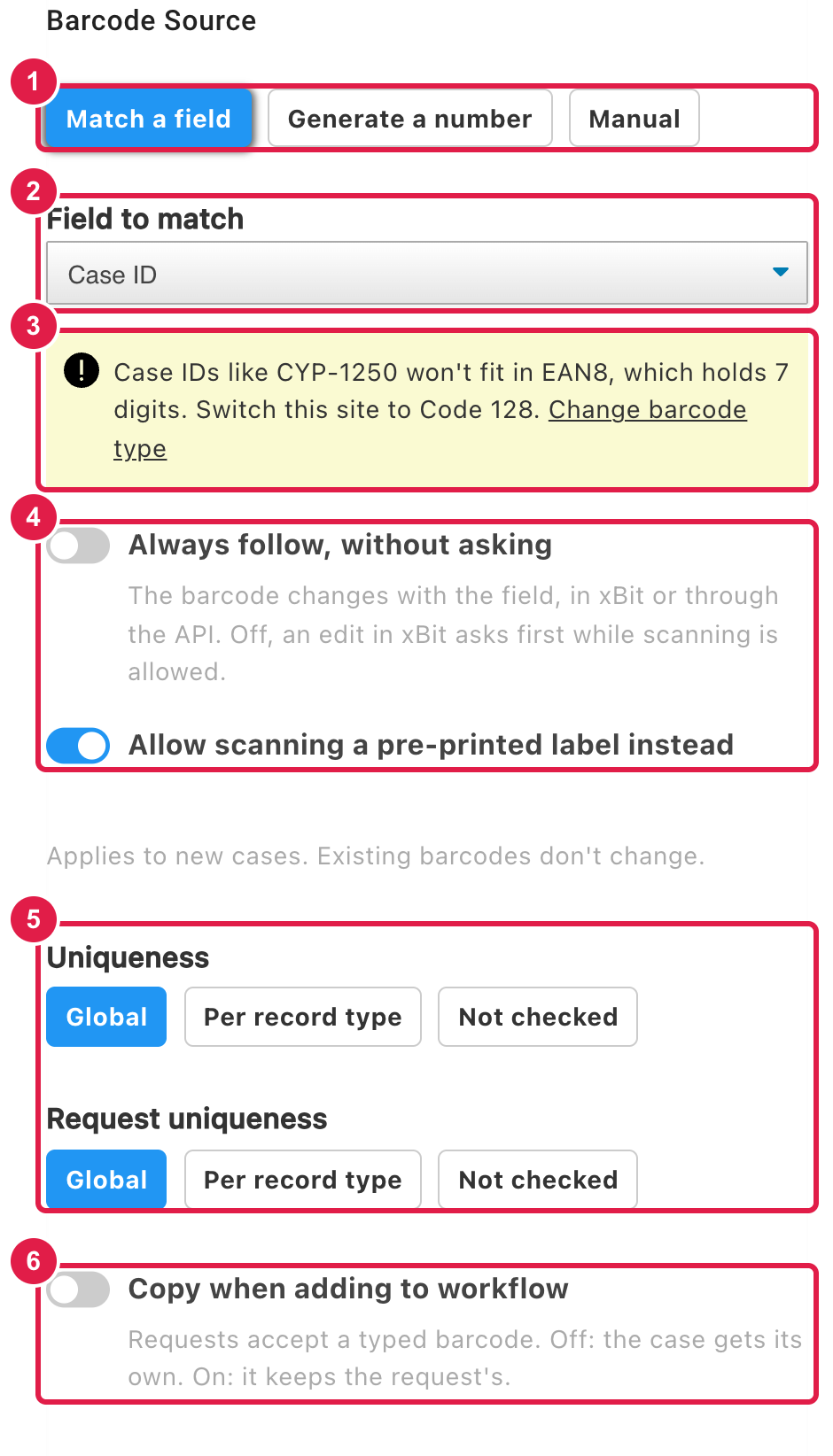
- Barcode Source:
Match a field: the barcode is the record's Case ID or Evidence ID.Generate a number: xBit assigns a unique number.Manual: works as before. This is the default, so nothing changes until you choose.
- Field to match: the ID the barcode follows.
- Barcode type warning: shown when your IDs won't fit your site's barcode type (for example, letters in an EAN8 site). Click
Change barcode typeto switch, usually to Code 128. - Changes to the ID:
- Always follow, without asking: the barcode follows ID changes made in xBit or through the API.
- Allow scanning a pre-printed label instead: keeps
Scan Existingfor agencies with pre-printed bags.
- Uniqueness:
Global,Per record typeorNot checked. Requests have their own Request uniqueness. - Copy when adding to workflow: keep a request's barcode on the case or evidence it becomes, or give it a new one.
The setting applies to new records; existing barcodes don't change.
Fill in the backlog
Once saved, the panel offers Generate barcodes for N cases without one (or evidence items).
It only fills empty barcodes, prints nothing, and lists any records it skipped and why.
Barcodes stay unique
- A duplicate barcode is refused wherever it's entered: in xBit, the lab submission portal or the API (unless Uniqueness is
Not checked). - Duplicate Barcodes report: if existing records share a barcode, it appears in the
Issuesmenu for admins until they're settled. - Scanning a barcode that several records share asks which one to open.
- Barcodes saved as
0or left empty no longer show as a shared placeholder.
When an ID changes
If a Case ID or Evidence ID changes and the barcode matches it, xBit asks Update the barcode too? before changing it, since labels already printed would stop scanning.
Scanning a barcode a record no longer holds lists the records that held it, and until when, so an old label still leads somewhere.
No more labels with a blank barcode
Printing a label that includes a barcode, for a record without one, now asks first:
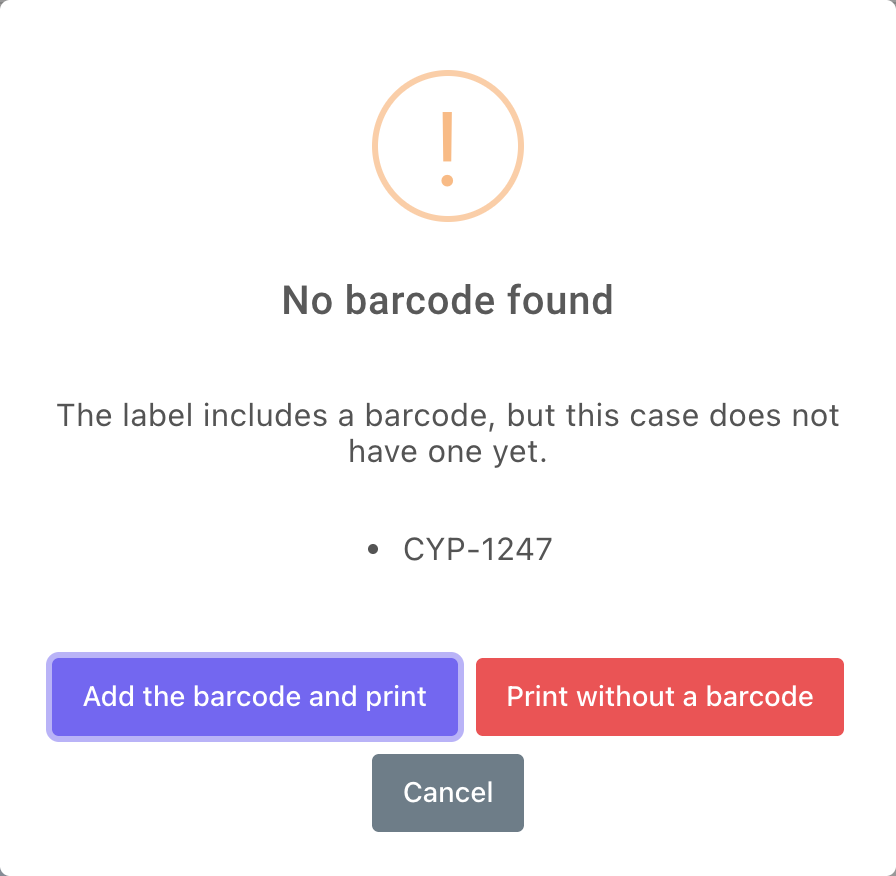
Add the barcode and printadds it using the Barcode Source, then prints.Print without a barcodeprints as before.
This works for the case and evidence label buttons and for bulk label printing.
More in Barcodes.
🚀 Other New Features
Case Status
- Choose which Completed status types set a case's completed date with the new Use for case completed date option in
Admin>List Manager> Case Status Type.
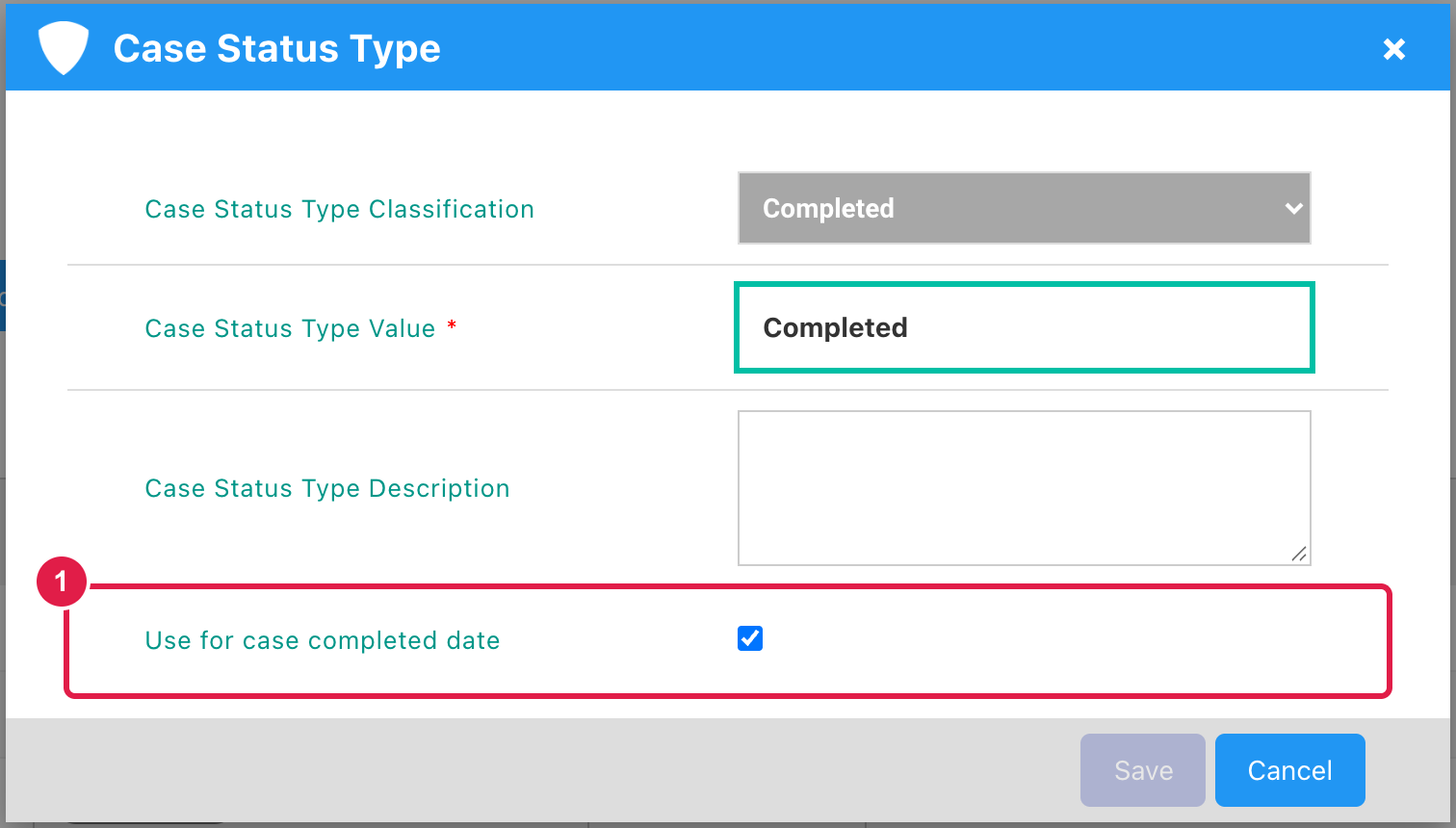
- A case moved on to a later Completed stage keeps the date of the status that marked it completed: on the Case Dashboard, the deadline tag, the case listing and Stats.
- A case's current status is always the top of its Status History, so a status entered with an earlier date no longer replaces it.
- If the Completed status is deactivated, the
Issuesmenu asks an admin which status to use. You will not see this menu otherwise. - See List Manager.
Case Stats & Evidence Stats
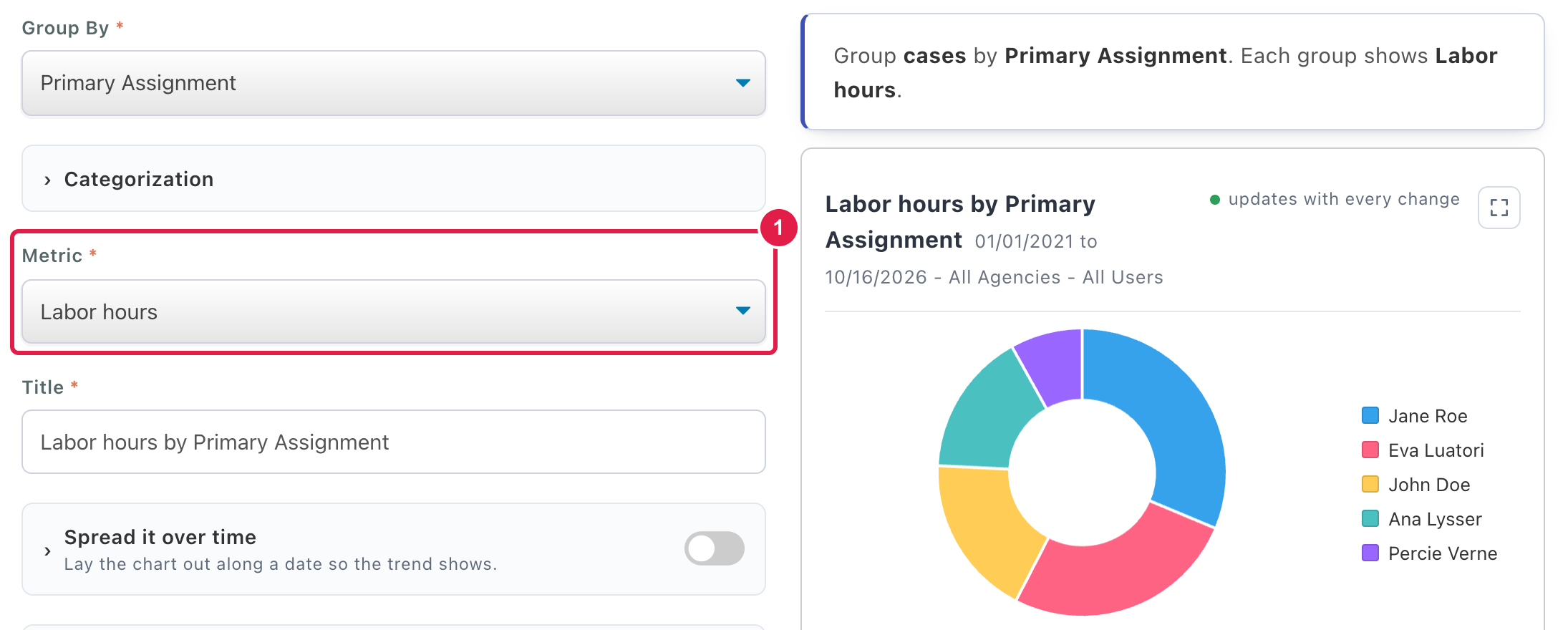
- Two new chart metrics: Labor hours and Consumables quantity, the totals recorded on labor and consumables expenses.
Label Builder
- Each label field has a new Print when blank switch, so an empty line can be left off the label. Existing labels keep printing as they do today.
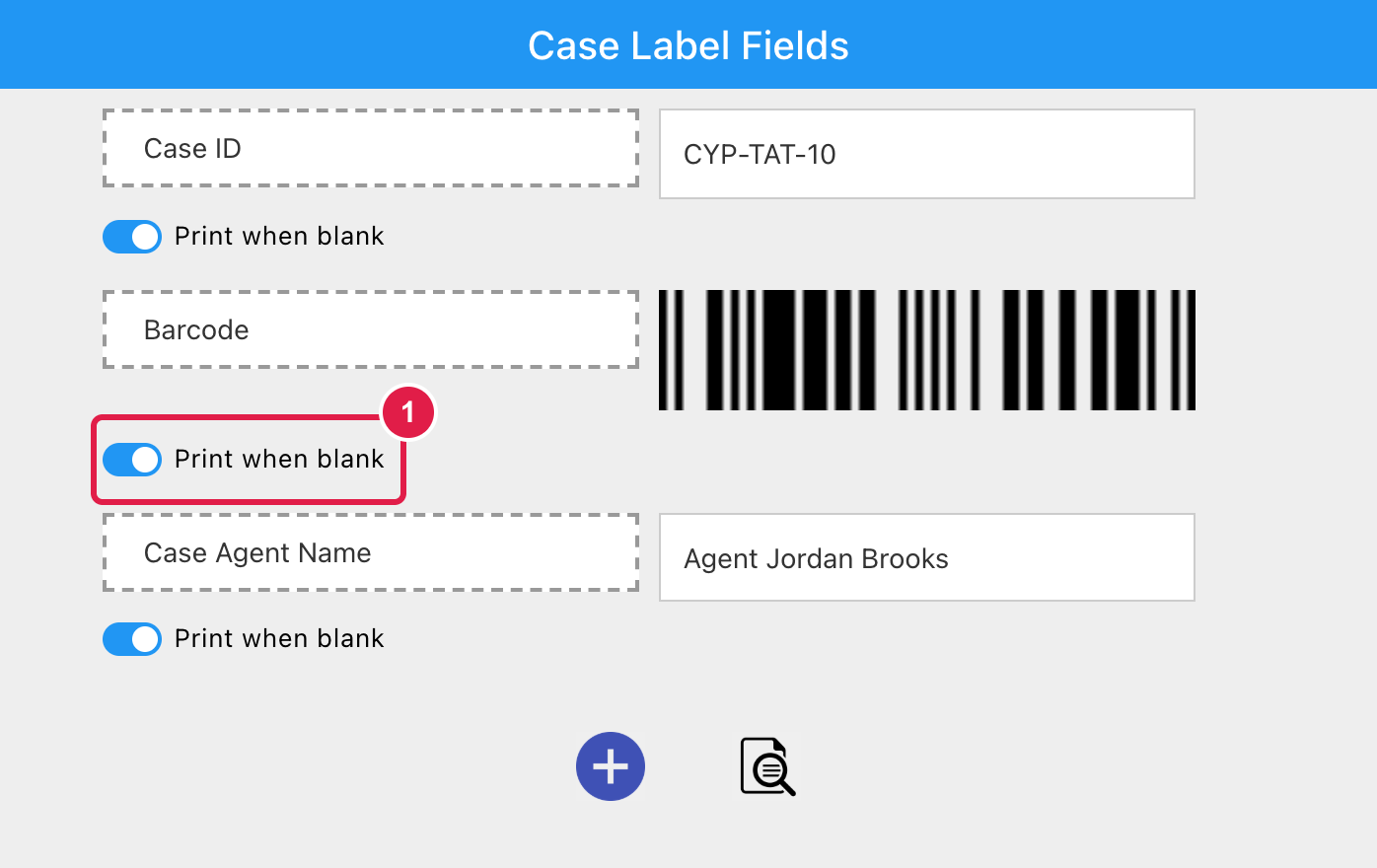
- Every printed label is logged with who printed it, when, and its values. Bulk prints also appear in each evidence item's audit log.
Keyboard
- Type to filter the top navigation, a case's menu, the form chooser or a case's evidence list: only matching entries stay lit, and the arrow keys jump between them.
- Paste an evidence ID onto a case's evidence list to select that evidence.
🐛 Bug Fixes
Search
- Global search finds case and evidence attachments by their contents again (PDF, Word, CSV, text files and scanned images).
- Email sent through a connected Gmail account no longer fails with "Failed to authenticate on SMTP server", and keeps sending after the first hour.
- Password reset emails now reach addresses containing a
+.
Login
- With captcha enabled on the login page, every password and recovery-code login is checked against the captcha first.
Case Reports
- Fixed case report PDFs showing no icon for text files and other non-image attachments.
- Review comments in case report PDF and Word exports now print as formatted text instead of HTML tags.
Case Permissions
- Fixed saving Case Permissions on a case with a primary assignee. Saving returns to the Case Dashboard, and a failed save now says so.
Lab Submission
- Fixed external submitters getting an error downloading a lab submission receipt.
- Cancelling a Case ID edit on a request no longer disables
Add to Workflowwhen Auto Case ID is on. - A Pattern field in the Request Manager now stays inside its box.
Request Date & Evidence Status
- Request Date and Evidence Status now show the same value everywhere, including reports and the API. Cases created from a request keep the request's date instead of the day it was accepted.
Form Builder
- Changing an evidence type's ICAC Stats Type saves again, instead of failing with "Changing ICAC Type Failed".
Stats
- Hours Breakdown shows its table for the chosen dates again, instead of "No entries found".
- In Stats Explorer, grouping by Evidence Status as Group By 2 loads again for hours, extraction and expense metrics.
USSS
- Fixed matching a case type to a USSS case type on New Case.
- The USSS Stats report download, from a case or
Stats>USSS Stats, opens in Excel without a repair prompt. Download Completed Cases ONLYnow leaves out cases without a valid USSS Case Type.
User Management
- A new user's e-mail address is flagged as already in use regardless of capitalization.
Setup
- Setup no longer stops on an error page when the uploaded license is already installed, and can't be submitted again once xBit is set up.
- Setup errors follow the setup language, and an invalid password is shown on the page instead of in a browser alert.
Notifications
- System notifications, such as the maintenance notice, show their message in the pop-up instead of under the menu bar.
🌈 UI Changes
User Management
- On
Admin>Groups / Users, the list view's 2FA shields now look different for each state, matching the grid view. Log User Outmatches the page's other buttons, and the user's online dot clears straight away.- Re-enable a disabled user from their card with the power button.
- Disabled users are no longer counted on group cards in Case Permissions and Group & User Manager, or listed on the Case Dashboard. The Groups tab shows them greyed out as Disabled.
Evidence
- The arrow keys move between evidence cards on the Case Dashboard again.
- Viewers are no longer offered in the Assigned To, Triaged By, Imaged By and Completed By dropdowns, since they can't be assigned evidence.