xBit v4.1.2 Release Notes
May 18, 2026
🚀 New Features
Configurable Case Status Types
Administrators can now fully manage Case Status Types directly through the List Manager, providing greater flexibility and control over case workflows across the entire system.
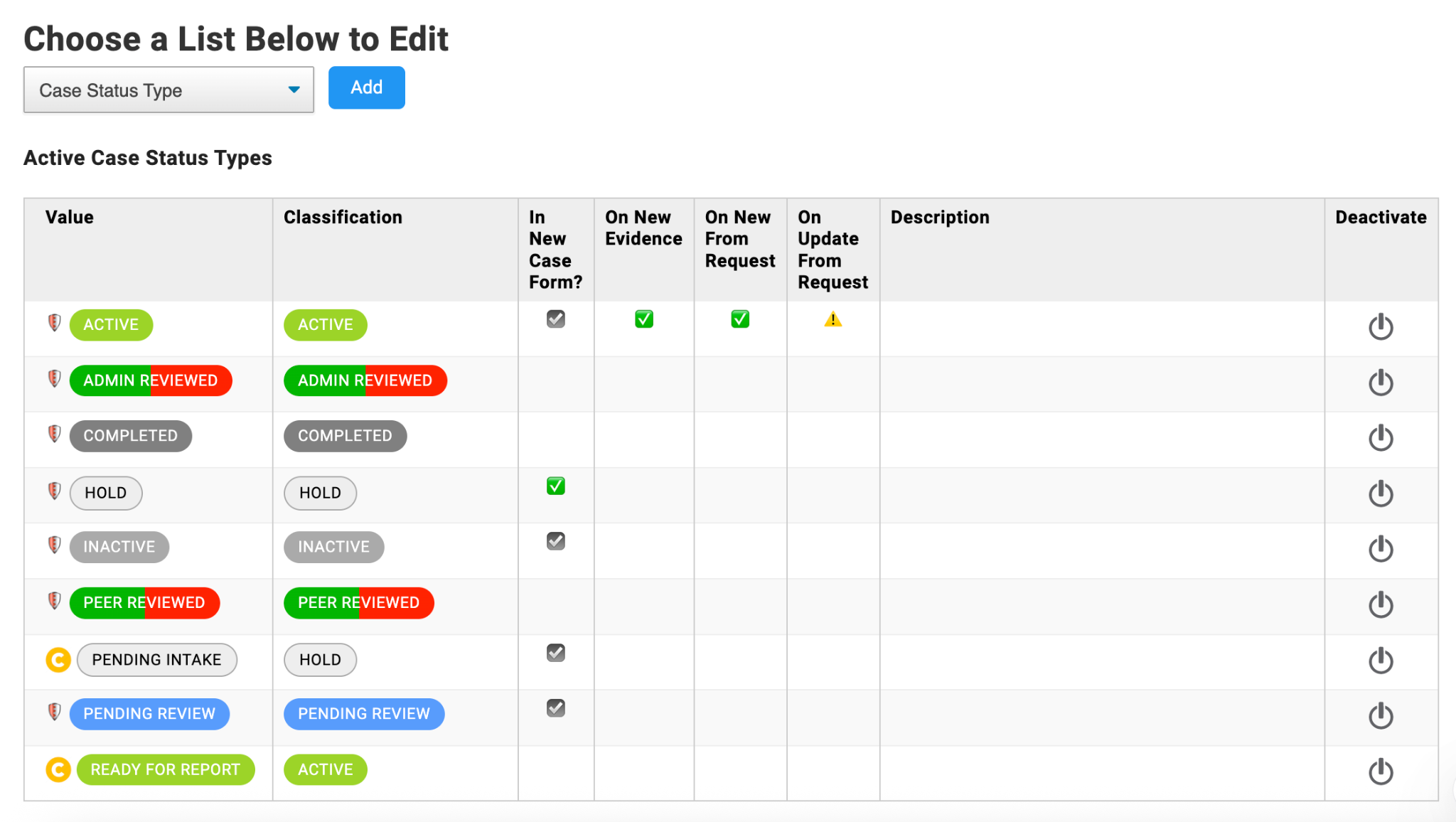
You can access this by going to:
Admin > List Manager > Case Status Type
Key capabilities include:
- Create, edit, enable, or disable custom Case Status Types
- Rename system status labels (example: “Active” to “Engaged”)
- Configure status descriptions and tooltips
- Define which statuses are available during new case creation
- Set default initial statuses for newly created cases
- Configure automated status transitions for:
- New evidence added to a case
- New Request Submissions added to workflow
- Existing cases updated from Request Submissions
- Customize default status notes generated during transitions
- Support linked references in Status History for:
- Request Submissions
- Evidence items
These enhancements allow organizations to tailor case lifecycle management to their internal terminology and workflow requirements while improving visibility and traceability throughout investigations.
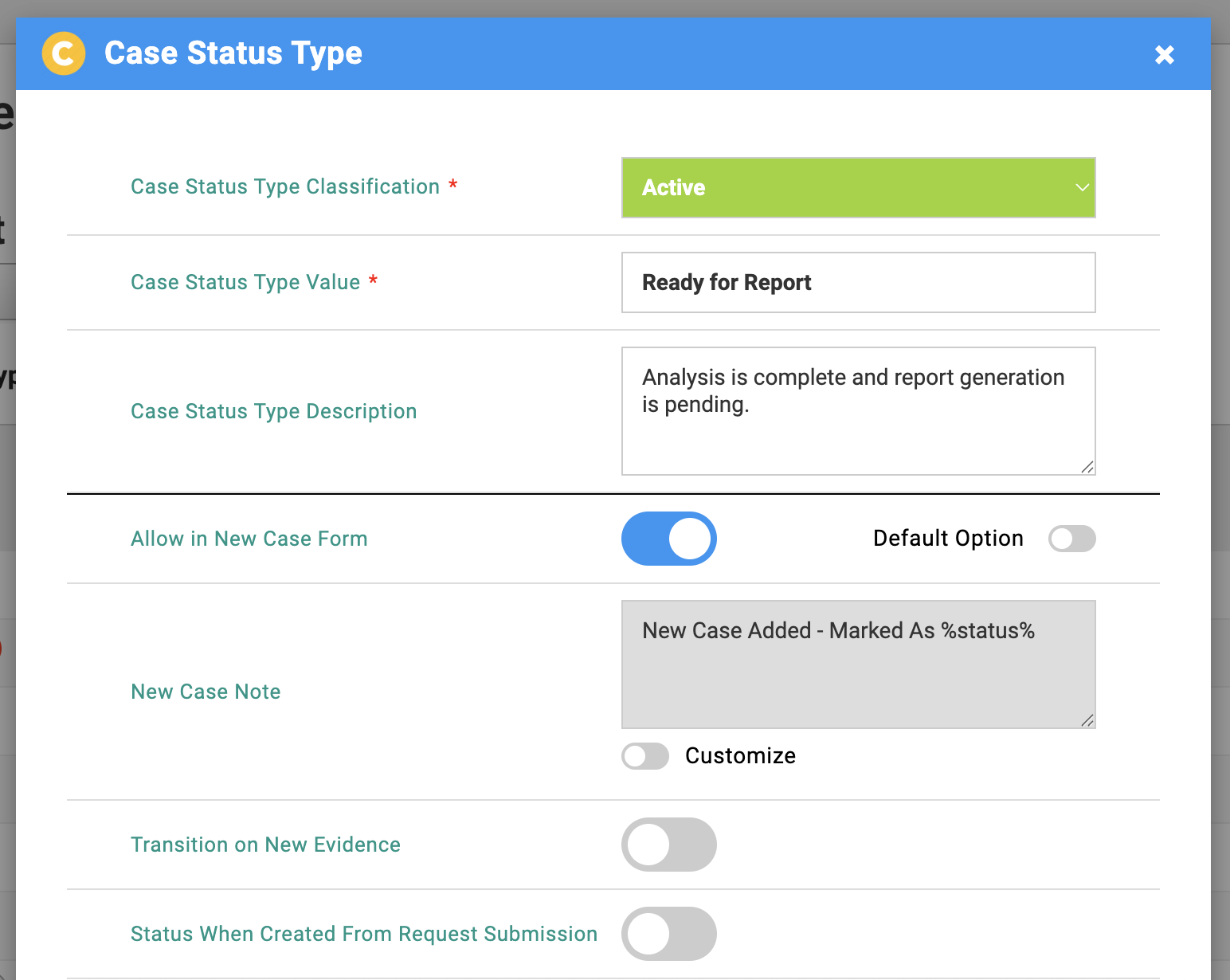
Core xBit Statuses
You are able to create custom variations of statuses based on the core xBit statuses:
- Active
- Admin Reviewed
- Completed
- Hold
- Inactive
- Peer Reviewed
- Pending Review
These will behave similarly to the core statuses though you are able to designate certain behavior for them. For example, you can set a new status of Reopened with a base status of Active and set it so that the status is set whenever there is evidence added via adding evidence through the New Evidence page or the Request Submission Manager.
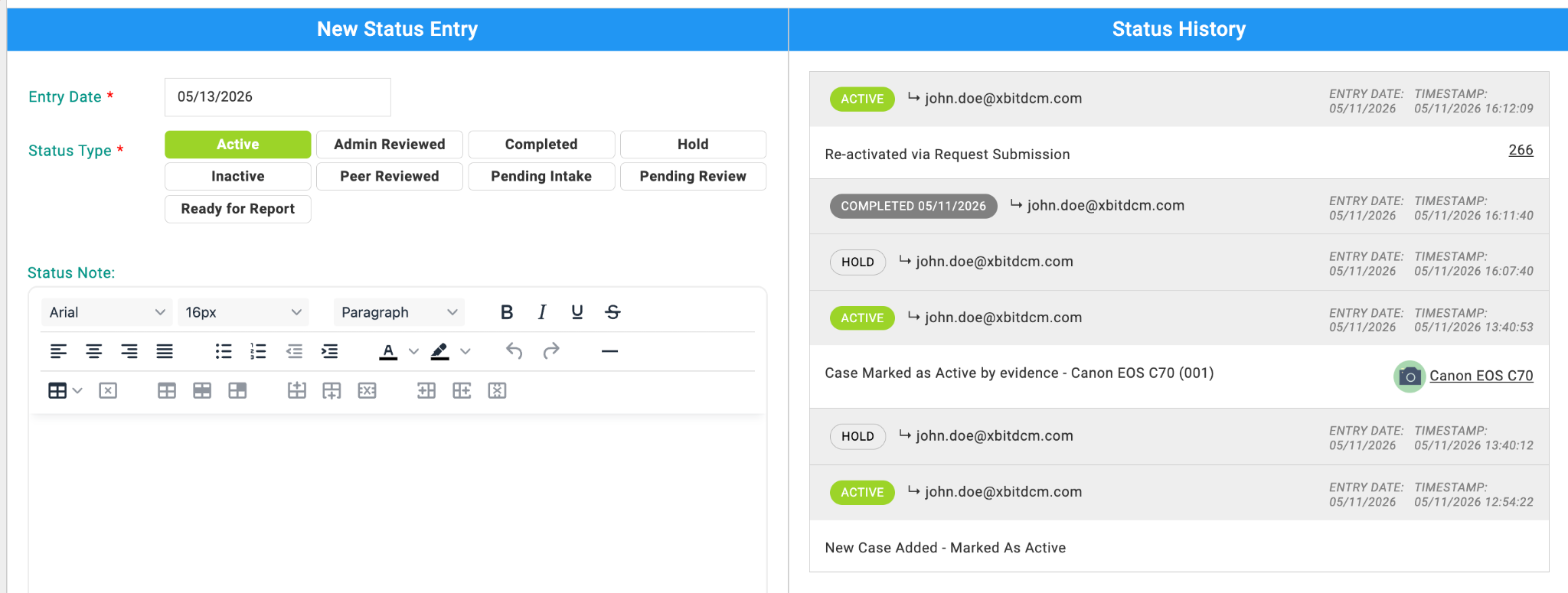
Improved Status History & Workflow Visibility
Case Status History now provides enhanced contextual tracking by linking related workflow actions directly within status entries. Users can quickly navigate to associated Request Submissions or Evidence records from the status timeline.
If a case status was changed by adding an evidence item or lab submission, then you can see that in the Status History and you can click on a link to see which evidence item or lab submission was the cause of the status change.
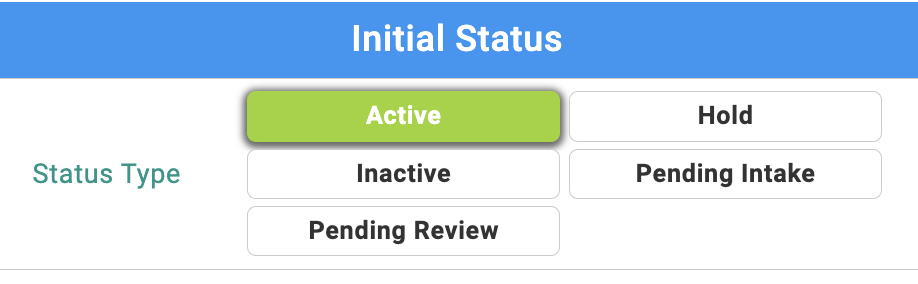
On the New Case page, you will see all the statuses you designate as Allow In New Case Form. You can set a default status that will be selected.
New Case
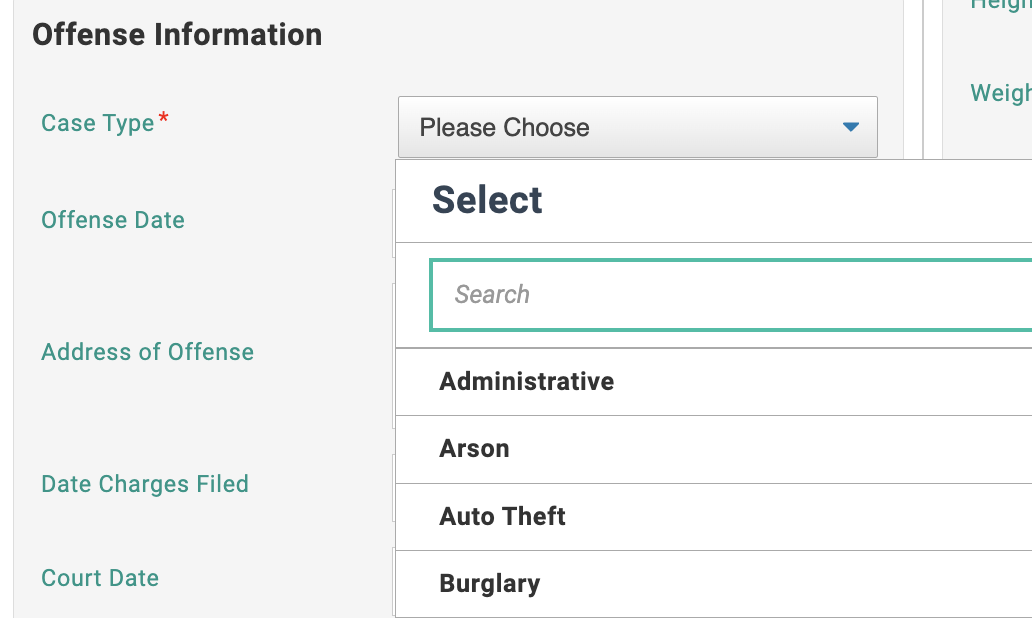
The New Case page now has search functionality to the Case Type dropdown. This makes it easier to find a case type if you have a long list of case types you have added.
Chain of Custody
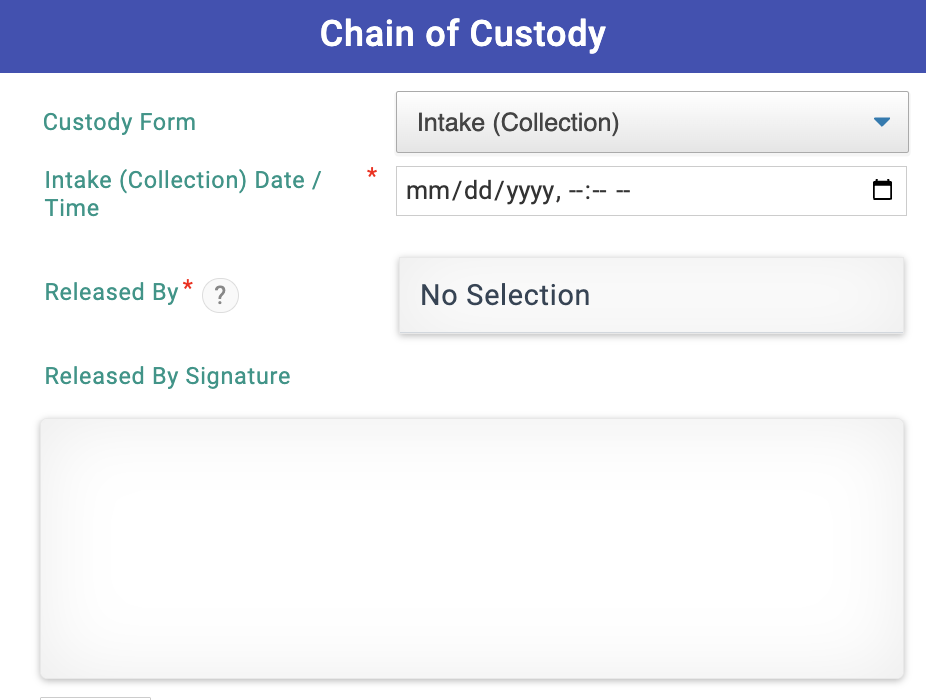
Added a selectable dropdown in the CoC section when creating new evidence, allowing users to choose which Chain of Custody form to use. These forms can be edited in the Form Builder.
New Case
Status Selection Improvements
On the New Case page, users will see all statuses designated as Allow In New Case Form. Administrators can also configure a default status that will be preselected.
Case Type Search
The New Case page now includes search functionality for the Case Type dropdown, making it easier to locate case types in larger lists.
Chain of Custody
Added a selectable dropdown in the Chain of Custody section when creating new evidence, allowing users to choose which Chain of Custody form to use. These forms can be edited in the Form Builder.
📝 Notes
Form Builder
- Added duplicate field detection warnings when creating new fields with similar existing names.
External Users
- Admins can now change the agency for external users with pending approval requests.
- Admins can now approve external user requests that include a non-existent agency selected under “Other” by assigning the correct agency during approval.
- Admins can now update the agency for already approved external users.
Settings & Translations
Added a translation notice to the About/Settings page when changing the system language explaining that only default xBit fields are automatically translated and that custom fields created in the original language require manual translation through Form Builder after switching languages.
🐛 Bug Fixes
Evidence Management
- Fixed an issue where saving evidence could fail when external users added evidence to lab submission requests.
- Fixed an issue on the New Evidence page where reselecting the empty “Select Evidence Type” option could trigger a failed request and leave the Evidence Type form stuck in a loading state.
- Fixed an issue where the “Use Auto CID” action would incorrectly disable the Add To Workflow button after manually entering an invalid CID value.
- Fixed issue where deleting evidence was not working.
- Fixed issue where bulk action was slow to toggle on.
Licensing & User Management
- Fixed an issue where users disabled due to license limits were not automatically re-enabled after uploading a valid license.
Lab Submission Request Manager
- Fixed an issue where permissions were not inheriting the Case Default group setting when adding items to workflow from request submissions.
- Fixed a JavaScript error that could occur during Lab Submission workflows when SMTP was disabled and users interacted with evidence form inputs or dropdowns.
- Fixed issue where users couldn’t delete attachments or requests
Request Submissions
- Fixed an issue where deleting a previously cancelled request submission would fail if the associated evidence contained attachments.
- Fixed an issue where Evidence IDs shown in Requests could change after adding evidence items to workflow.
- Evidence IDs now remain consistent between Requests, workflow actions, and evidence details views.
Report Builder & Reporting
- Fixed an issue where the Uploads block could not be moved to the bottom of a report template after being deselected and re-added through Group Items.
- Fixed an issue in Legacy PDF Reports where the “Hours” field was missing from generated PDF output while still appearing in document exports.
- Fixed an issue where uploads embedded inside RTF content would not render correctly in the Report Builder preview.
- Fixed an issue where Upload Content Type image preview fields would not render in generated reports when added directly as fields instead of inside an RTF block.
- Fixed an issue where Rich Text fields created in Evidence Fields or Evidence Intake forms would not display in Report Wizard generated reports.
Asset Management
- Fixed an issue in Edit Grants / Assign Assets where assets already listed under Currently Assigned Assets would incorrectly appear again in the available assignment list.
- Fixed an issue in Edit Asset Holders / Assign Assets where the asset holder list became unresponsive after unassigning an asset.
- Fixed an issue where the right-side asset assignment pane could fail to load after removing an assigned asset.
- Fixed an issue where the Assigned To column in the New Asset Holder modal displayed empty parentheses instead of assigned user names for assets already assigned to XBIT users.
Authentication & User Management
- Fixed an issue where disabled Active Directory users could incorrectly log in and trigger duplicate user account creation.
- Fixed an issue that caused an error when disabling Active Directory users from the Groups / Users list view.
Uploads
- Fixed an issue where video files could not be uploaded through the Uploads section of a case, despite working correctly in Form Builder upload fields.
List Manager
- Fixed an issue where the List Manager could fail to load correctly after adding a new Expense Type entry.
Form Builder
- Fixed an issue where removing a field from Form Builder could fail if the field was still referenced in Label Builder configurations for case or evidence labels.
Chain of Custody
- Removed the “Always Required” setting from CoC forms configuration.
Agency Manager
- Fixed issue where disabled agencies were being listed when editing external asset holders.
🌈 UI Changes
Reports & Reporting
- Fixed an issue where mixed font weights rendered with incorrect vertical alignment in generated reports and receipts.
- Fixed an issue where the Lab Submission Receipt preview did not display sample field data correctly.
List Manager
- Removed the “Select list” placeholder option from the List Manager dropdown to prevent it from appearing as a selectable value.
Settings
- Updated timezone dropdown ordering so America timezones now appear first in the list.
Translations
- Fixed a missing Spanish translation in the Case Activity column tooltip within Case Manager for case status review activity.
Memos & Expenses
- Updated Memo Type and Expense Type fields to use radio button selections instead of dropdown menus for faster and clearer data entry.
- Fixed issue where memo table was being cut off.
User Management
- Improved the Groups / Users list view with hover state indicators, clickable cursor feedback, and row highlight styling.
Asset Management
Added unsaved changes warnings across Asset Management workflows to help prevent accidental data loss when closing modals with pending changes.
Added confirmation prompts for:
- Edit Asset Holders / Assign Assets
- New Asset Holder
- New Grant
- Edit Grants / Assign Assets
Users are now warned before closing dialogs with unsaved asset assignment or configuration changes.
Expiration Banner
- Fixed an issue where the expiration banner link displayed raw HTML.
Form Builder
- Fixed an issue where the Add New Field button appeared in the wrong location.
General UI
- Fixed issue of extra spacing at the top of some pages.