xBit v4.0.0 Release Notes
November 05, 2025
🚀 New Feature: xBit API Integration
We’re excited to announce the launch of the xBit Digital Case Management API, enabling seamless integration between xBit and your existing systems, workflows, and automation tools.
The new xBit REST API allows users and developers to programmatically interact with their case data. This includes the ability to:
-
Create, retrieve, update, and delete case records and associated entities
-
Upload and retrieve digital evidence directly via secure endpoints
-
Automate workflows such as case creation from external systems
-
Integrate with third-party tools like reporting dashboards, evidence management systems, and cloud automation platforms
-
Access user and audit logs to maintain data traceability
API access respects all xBit user permissions and employs key-based authentication for secure, controlled access. Administrators can manage API tokens and limit access by user role, ensuring that data exposure aligns with organizational policies.
By leveraging the API, organizations can tailor xBit to fit seamlessly into their broader digital ecosystem. Here are some ideas on how you can utilize the API:
-
Case Synchronization - When a new case is created in your Records Management System, it’s automatically mirrored in xBit, reducing double entry into systems.
-
Field Notes on the Go - Investigators can upload notes or memos from their phone
-
Custom Dashboards for Command Staff and Analysts - Visualize live case, evidence, and chain-of-custody data for instant operational insight
The API helps meet any requirements an agency might have.
Because working with APIs involves technical implementation — such as authentication, endpoint configuration, and data formatting — you will typically need a developer or someone with software development experience to build out and maintain these integrations.
The API is not intended for everyday users to interact with directly; instead, it serves as a powerful integration layer that allows your organization to extend functionality through custom applications and dashboards.
To enable the API, go to:
Admin → About / Settings → API

Enable API has 3 options:
- Everyone
- Admin Only
- Disabled
Admin Only only lets admins create API keys.
To create an API key, click on your user icon in the top left corner. They will have your initials.

On the right hand side, you will see the API key section. Click on New API Key.

You will be able to choose the permissions the user of the API key will have access to. Read lets you view data and Write lets you change data.
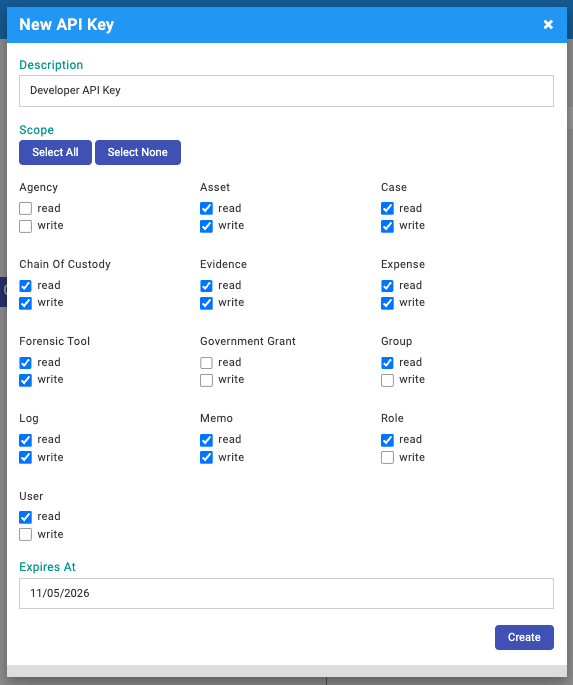
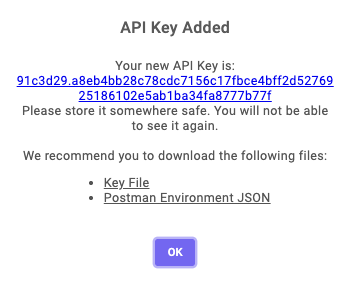
You will get your API key. Please write this down as you will only receive it once. You will also have the option of downloading the following:
Key File (.json) — Contains the generated API token. Store this securely; it will not be shown again.
Postman Environment (.json) — A ready-to-import Postman configuration that includes your API URL, token, and environment variables for testing endpoints quickly.
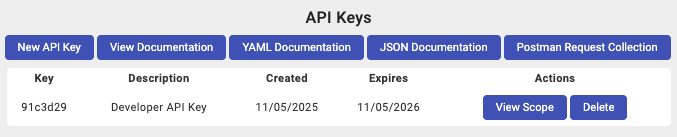
You can see the API key on your user page once you have finished creating it. We also provide the following documentation and resources:
View Documentation
Opens xBit’s API Reference directly within your environment. This is where you can view:
- Base API URL and authentication instructions
- Endpoint lists (Cases, Evidence, Memos, etc.)
- Request/response structures
- Example code snippets
Ideal for developers who want to quickly understand how to interact with xBit programmatically.
YAML Documentation
Downloads the API’s OpenAPI (Swagger) specification in YAML format. Useful for:
-
Integrating with developer tools that import OpenAPI specs
-
Reviewing endpoint structure in raw form
-
Adding to internal API repositories or documentation portals
JSON Documentation
Downloads the same OpenAPI (Swagger) spec as a JSON file. Useful for:
-
Importing directly into Postman, Insomnia, or other API testing tools
-
Automated documentation generators
-
Custom API client development
Postman Request Collection
Downloads a ready-to-use Postman Collection with all xBit endpoints preloaded. Ideal for developers and analysts who want to:
-
Test API calls immediately
-
Explore endpoints without coding
-
Use alongside your downloaded Postman Environment JSON (from key creation)
Together, the Collection + Environment give you a fully configured Postman workspace.
Let's give a quick overview into the API documentation. The full documentation is available once you create the API key.
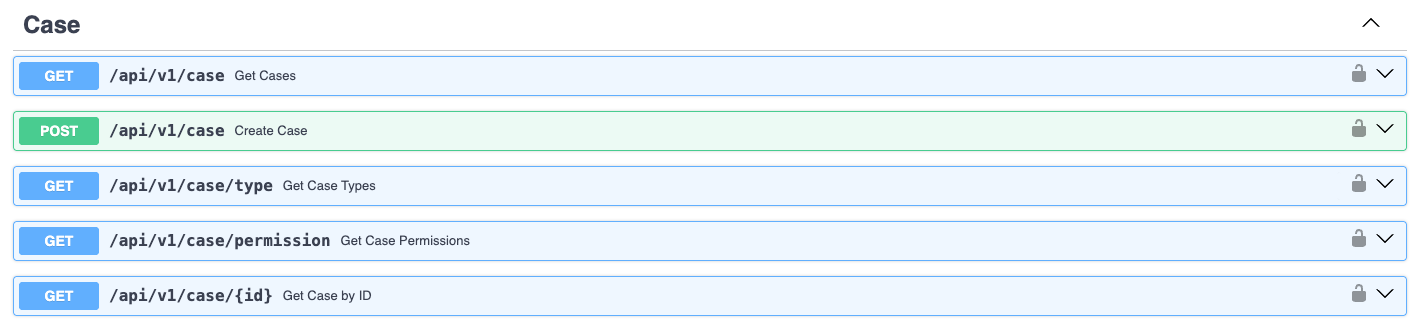
The API documentation gives you a full list of Endpoint, request/response structures, and example code snippets.
You will be able to access:
- Cases
- Evidence
- User Roles
- Users
- Agencies
- Assets
- Government Grants
- Chain of Custody
- Expenses
- Forensic Tools
- Memos
- Logs
- Groups
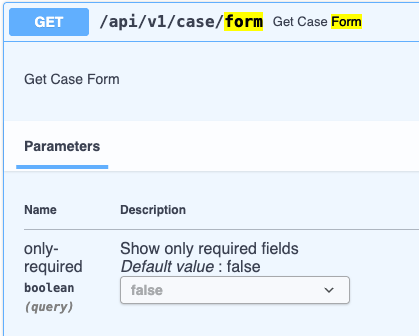
Within each endpoint you will have a list of parameters:
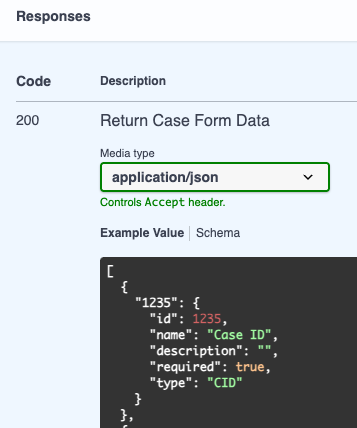
As well as an example of what the response will look like:
Please note: xBit Customization
Because xBit Digital Case Management (DCM) is a highly customizable platform, many form fields are defined dynamically by administrators.
Each organization can configure its own set of fields such as custom case attributes, custody form fields, or evidence. To support this flexibility, xBit stores and references fields by their unique ID values.
{

  "1_1235": false,
  "1_2017": "lorem ipsum dolor",
  "1_1236": 14,
  "1_1917": "Lorem ipsum dolor sit amet consectetur...",
}
To interpret which field ID corresponds to which label, make a request to the Form Data endpoint:
[
  {
    "1235": {
      "id": 1235,
      "name": "Case ID",
      "description": "",
      "required": true,
      "type": "CID"
    }
  },
  {
    "1236": {
      "id": 1236,
      "name": "Priority",
      "description": "",
      "required": false,
      "type": "select"
    }
  }
]
Best Practices:
- Always fetch the latest form schema before submitting or updating case data, especially if your xBit environment uses custom fields.
- Validate your data against the schema prior to making a POST or PUT request. Ensure that required fields are present, field types (e.g., text, date, select, CID) match the expected format, and that select or lookup values are valid options from the schema.
🐛 Bug Fixes
Chain of custody
- Fixed issue where the released by field autofill gave the logged-in user precedence over the previous custody receiver.
External Users
- Moved external user code settings to SMTP tab.
- Added code resend timeout setting.
Evidence
- Fixed broken evidence page urls in the system.
Report Builder
- Fixed issue where short text pseudo text not showing.
Request Submission
- Fix case field validation failing when Request Submission is added to workflow.
Reviews
- Fixed Reviews Assigned to Me Top Navigation counter
Search
- Now show html allowed tags in search results for review comments
🌈 UI Changes
Form Builder
- Sort field options by position in field library selector.
List Manager
- List Manager is now refreshed with a new UI.