EMAIL/SMTP Configuration
xBit uses EMAIL/SMTP settings to send system notifications and security emails, including:
- Lab Submission Request notifications to Admin users
- Operational notifications to relevant users (e.g., Evidence Assignments, Review Requests)
- 2FA / Login OTP emails when users attempt to sign in (if 2FA is enabled)
EMAIL/SMTP – Main Settings
Edit these settings in the top level menu > Admin > About / Settings > Email / SMTP.
1) Enable / Disable SMTP
-
Enabled: xBit will send emails using the configured provider.
-
Disabled: email sending is turned off (no notifications, no OTP emails via email).
Tip: If SMTP is disabled while 2FA is enabled and email OTP is required, users will fail to receive OTP emails.
2) E-mail Type (Provider Selection)
This determines how xBit connects and authenticates to an email service. Available options:
A) SMTP
Use this for most SMTP servers (company mail server, hosted SMTP, Postfix, AWS SES etc).
Configuration Items:
- SMTP SYSTEM URL: (Optional) xBit System URL.
- SMTP 'FROM' ADDRESS: Notification sender address.
- SMTP HOST: SMTP Server Address.
- IS SMTP RELAY: Enable/Disable the SMTP Relay mode. An SMTP Relay service forwards messages to other servers. If Relay is enabled, SMTP USER and SMTP PASSWORD options are disabled.
- SMTP USER: SMTP username.
- SMTP PASSWORD: Password of the SMTP username.
- SMTP PORT: Port of the SMTP server.
- SMTP TLS: Indication whether TLS is being used by the SMTP server.
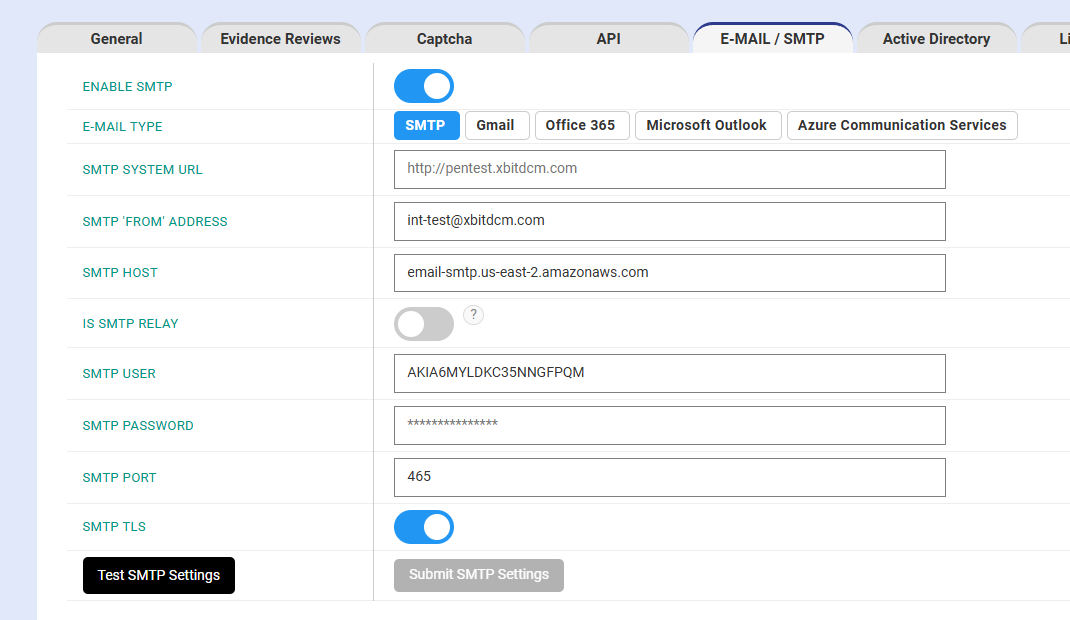
Once the above configurations are done, need to click on 'Test SMTP Settings' button, once clicked, an email will be generated and delivered to the current logged in user's email address.
If email sending succesful, 'Submit SMTP Settings' will be active. Please click on 'Submit SMTP Settings' to save the current settings.
B) Gmail
Use when sending via Google Workspace or Gmail SMTP / OAuth flow (depends on how xBit is implemented in your environment).
C) Office 365
Use for Microsoft 365 / Exchange Online (often OAuth-based).
D) Microsoft Outlook
Usually overlaps with Outlook.com / Microsoft consumer accounts or Outlook SMTP/authorization method depending on implementation.
Typical requirements:
- Account authentication method supported by xBit
- From Address restrictions as per Microsoft rules
E) Azure Communication Services (ACS)
Uses Azure Communication Services Email capability (API-based sending rather than classic SMTP).
External User Timeout Setting
This typically controls how long external-user sessions or access links remain valid (exact behavior depends on your xBit deployment/config).
- External User Time between code sending (min 30 seconds)
- External User Code Timeout
- External User Session Timeout
Notification Settings
This area generally controls which notifications are enabled and who receives them.
- Notify on Evidence Assignment
- Notify on Reviewer Request
- Notify on Review Start
- Notify on Submitted Request from External Users